AxiaCraft brings the work, the agents and the controls into one place. Start with a business prototype in the Gallery, a product brief or an existing application. Give agents the right skills and tools, choose how they use AI, and follow delivery through to review and release.
Installed inside your own environment, with people deciding what matters and where approval is needed.
Let the people with the problem show the solution.
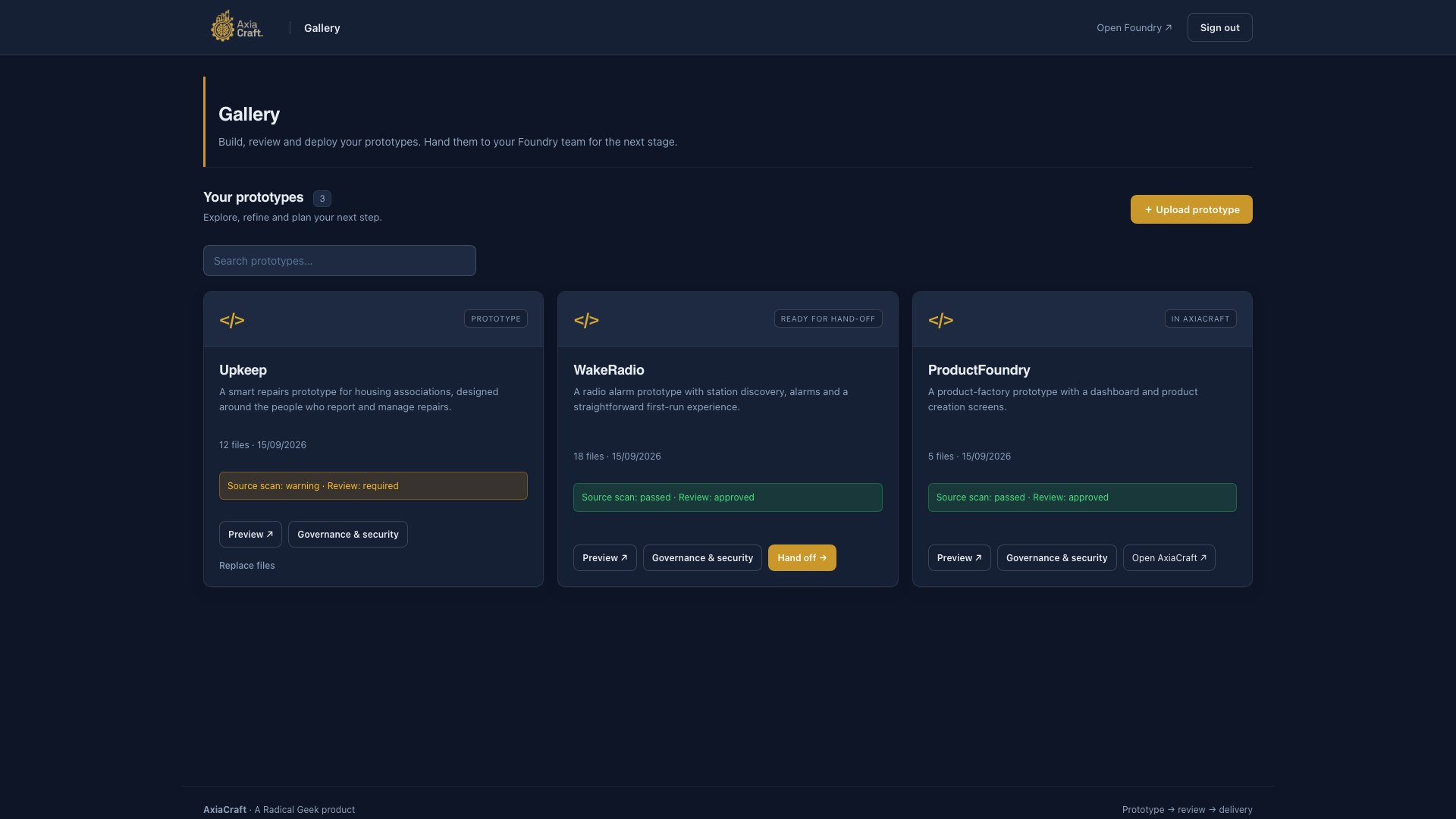
AxiaCraft Gallery gives business users a shared home for prototypes built in Codex or Claude. Skills guide the build, package the files and upload them when asked, so colleagues can try an idea and decide whether it should progress.
A requested handoff carries the source and brief into a draft AxiaCraft plan. The engineering team then works against the agreed requirements, including security, reliability, performance and supportability.
Enlarge screenshot ↗Give every prototype a place to be tried.Gallery demonstration from the product film · example prototypes and review states.
Preview the ideaColleagues can try the working prototype.
See its statusReview state makes the next step visible.
Hand it overAn approved idea can move into delivery planning.
01 · Plan and deliver
Turn an idea into work the team can finish.
Start with a product brief, an approved Gallery prototype or an existing application. AxiaCraft helps turn the outcome you want into a plan, a prioritised backlog and manageable rounds of work.
Give every product a workspace. Keep tasks, decisions, agent activity and progress together on a board.
Build a team around the work. Assign a lead, developers and specialist reviewers. Set how many agents can work on the board.
Keep delivery moving. Plan sprints, track what is ready or blocked, and choose whether completed stages advance automatically or wait for approval.
In practice: A request to improve an internal booking tool becomes a visible plan, assigned tasks and a reviewed release.
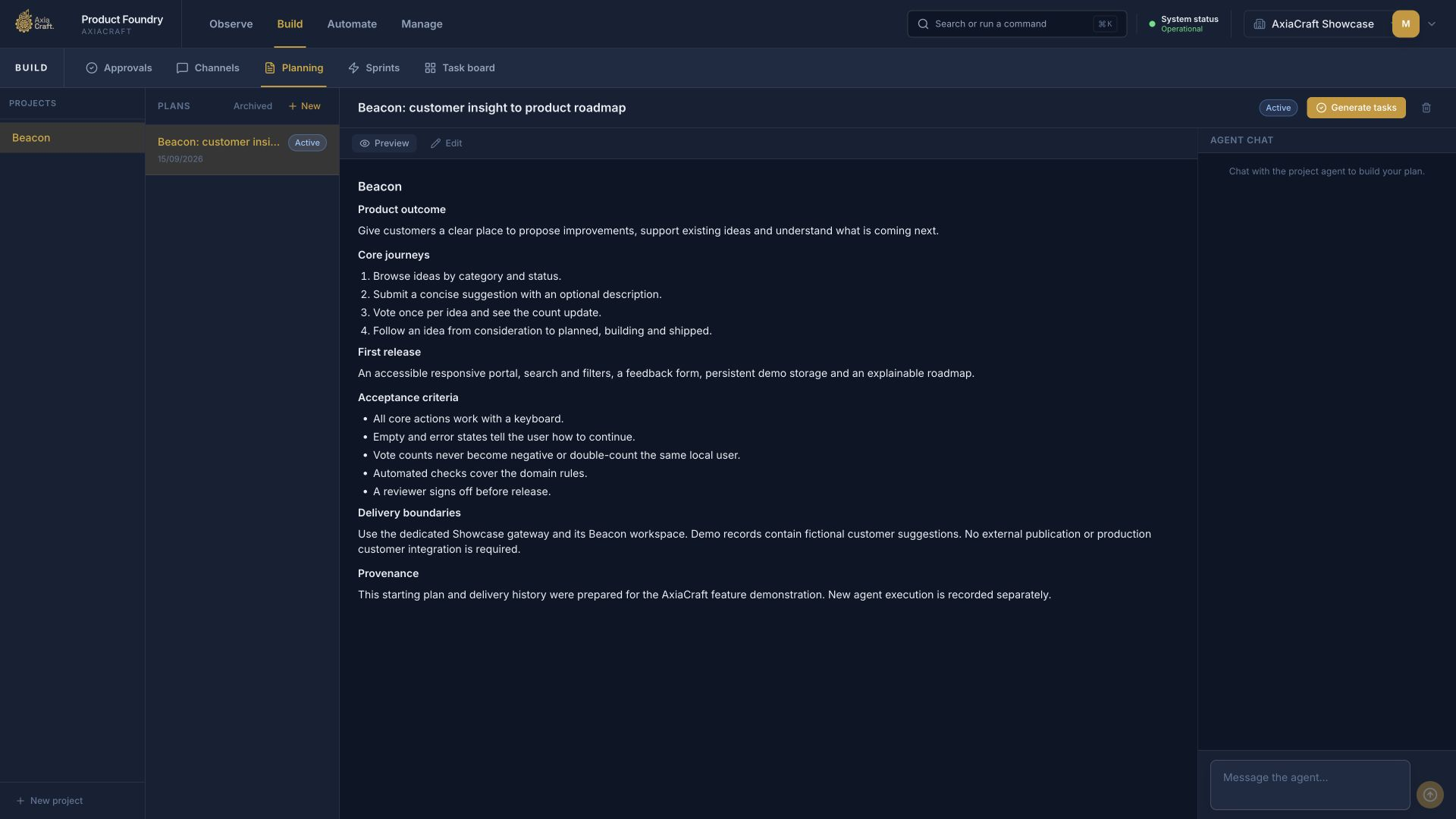
Enlarge screenshot ↗Agree the outcome and the checks for success.AxiaCraft product capture · the Beacon showcase plan uses demonstration content.
Product outcomeStart with what people need the application to do.
Acceptance criteriaMake the checks for a useful release explicit.
Generate workTurn the agreed plan into tasks for the team.
Equip the team
Give agents the know-how and access they need.
A skill explains how to do a job. A tool lets an agent take an action or get information from a system. AxiaCraft manages both.
02 · Managed skills
Make your way of working reusable.
Package instructions, procedures and supporting material into skills that agents can use across projects.
Browse and manage skills in a central catalogue.
Group related skills into packs and update them from connected sources, so teams can share the same guidance.
Give agents the team’s default skills or choose a specific set for each role.
Reuse your architecture standards, review checklists and delivery conventions.
For example: Use Gallery skills in Codex or Claude to prepare and upload a prototype. Inside AxiaCraft, give developers your build guidance and reviewers your security checklist.
03 · Managed tools
Control which systems agents can use.
Bring connections to engineering tools, data services and operational systems into a managed catalogue.
Discover integrations, choose a known version and review it before making it available.
Keep connection settings together and refer to securely stored credentials.
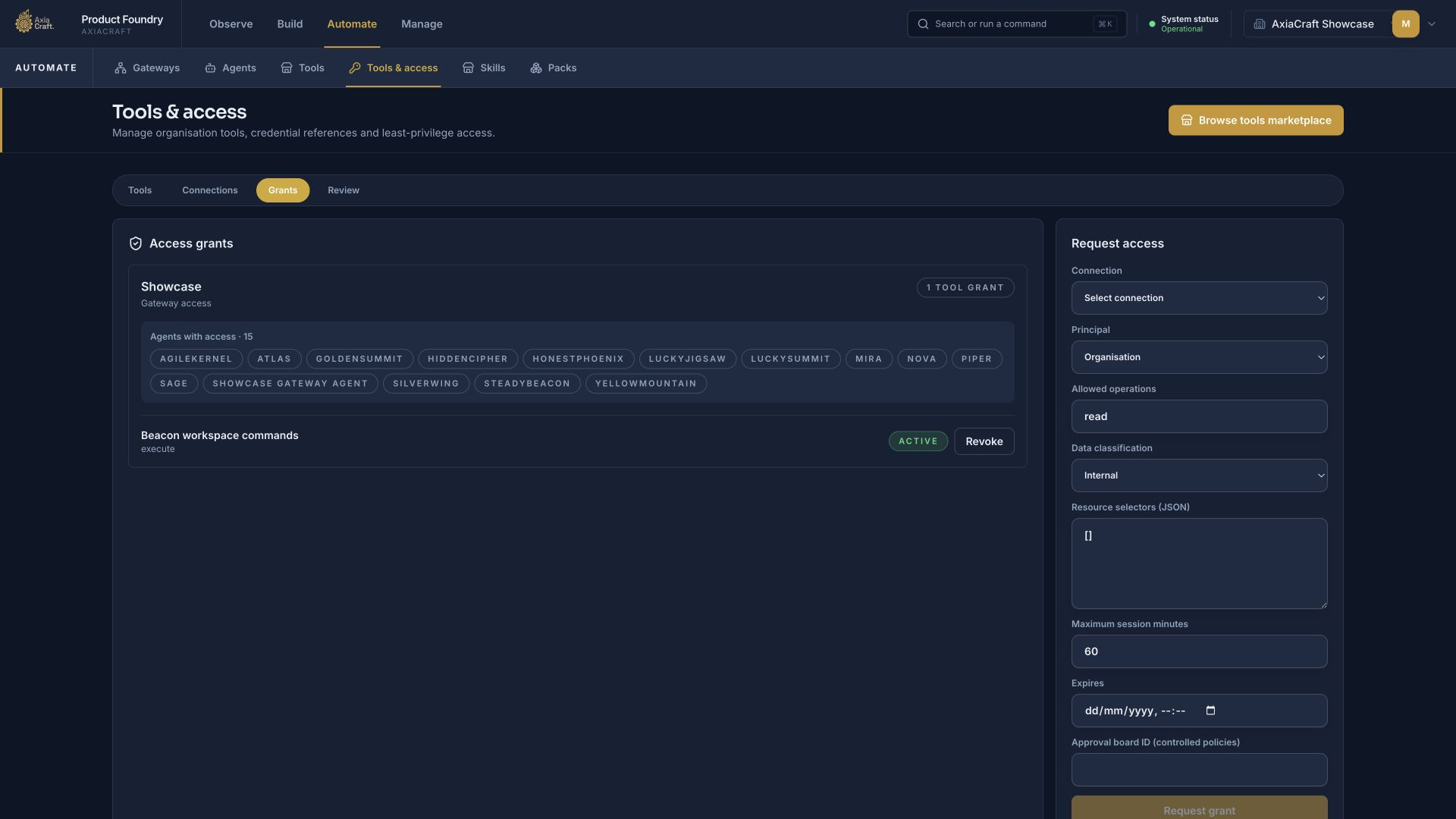
Choose which teams, roles, agents or tasks can use a tool, what they can do and how long access lasts.
See installation and health status, and withdraw access when a tool is no longer approved.
For example: Give a reviewer read access to service logs while keeping deployment access with the agents authorised to release.
How it works · illustratedYour standards become guidance agents can reuse.
01Write the guidance
Capture the procedure, examples and checks in a skill.
02Manage it centrally
Group related skills into packs and maintain shared guidance.
03Equip the right roles
Give developers and reviewers the skills their work needs.
Example: a security-review skill carries your checklist and reporting format into each review.
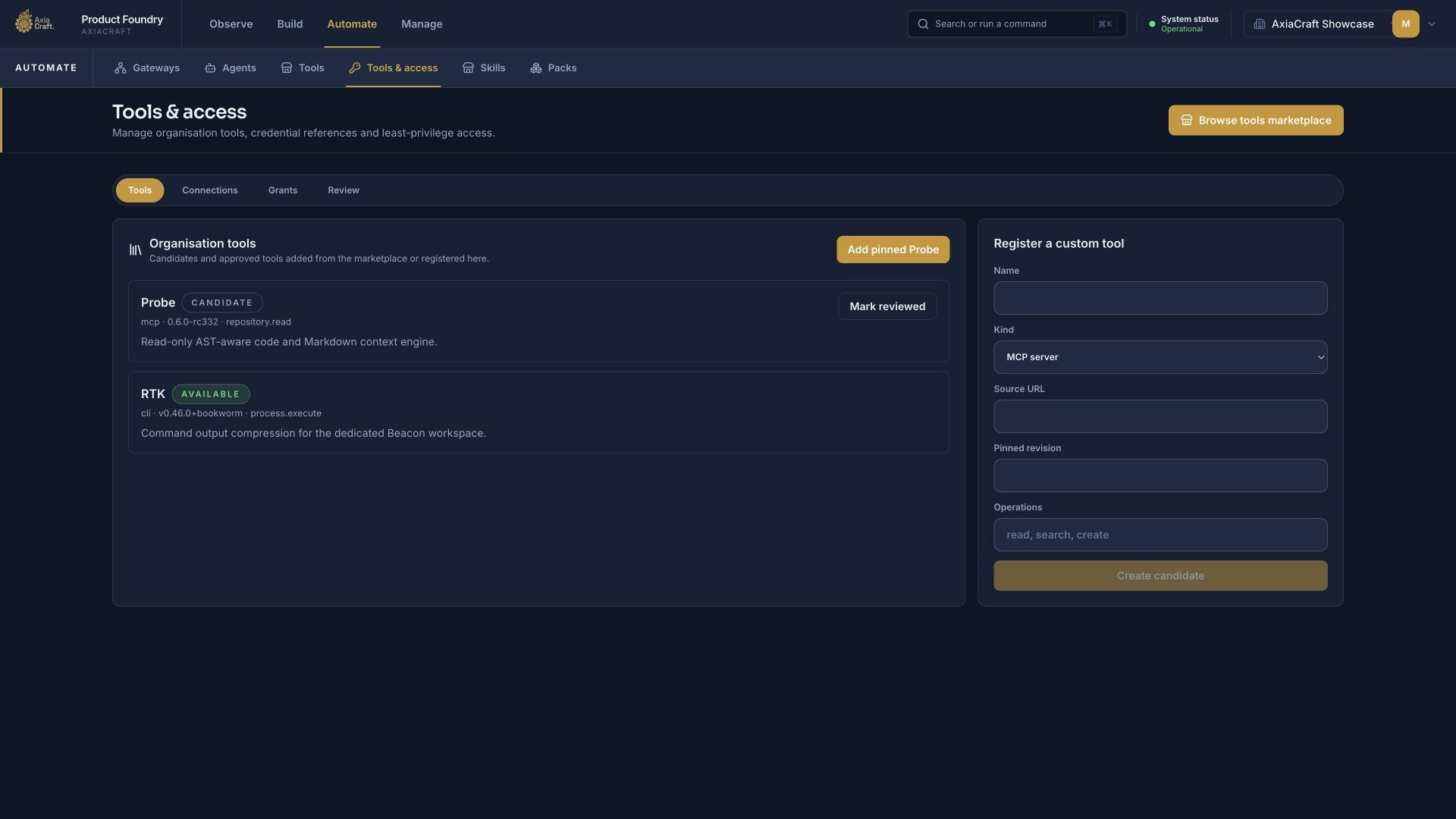
Enlarge screenshot ↗See which tools are available to your agents.AxiaCraft product capture · Showcase tool catalogue, with candidate and available states.
Review a candidateAssess a tool before making it available.
Keep a known versionSee the version and the operations it provides.
Control accessManage the connections and grants separately.
See how tool access is assignedEnlarge screenshot ↗Choose who can use a tool and what they can do.AxiaCraft product capture · Showcase access grants and the request form.
04 · Model routing
Choose the right AI for each kind of work.
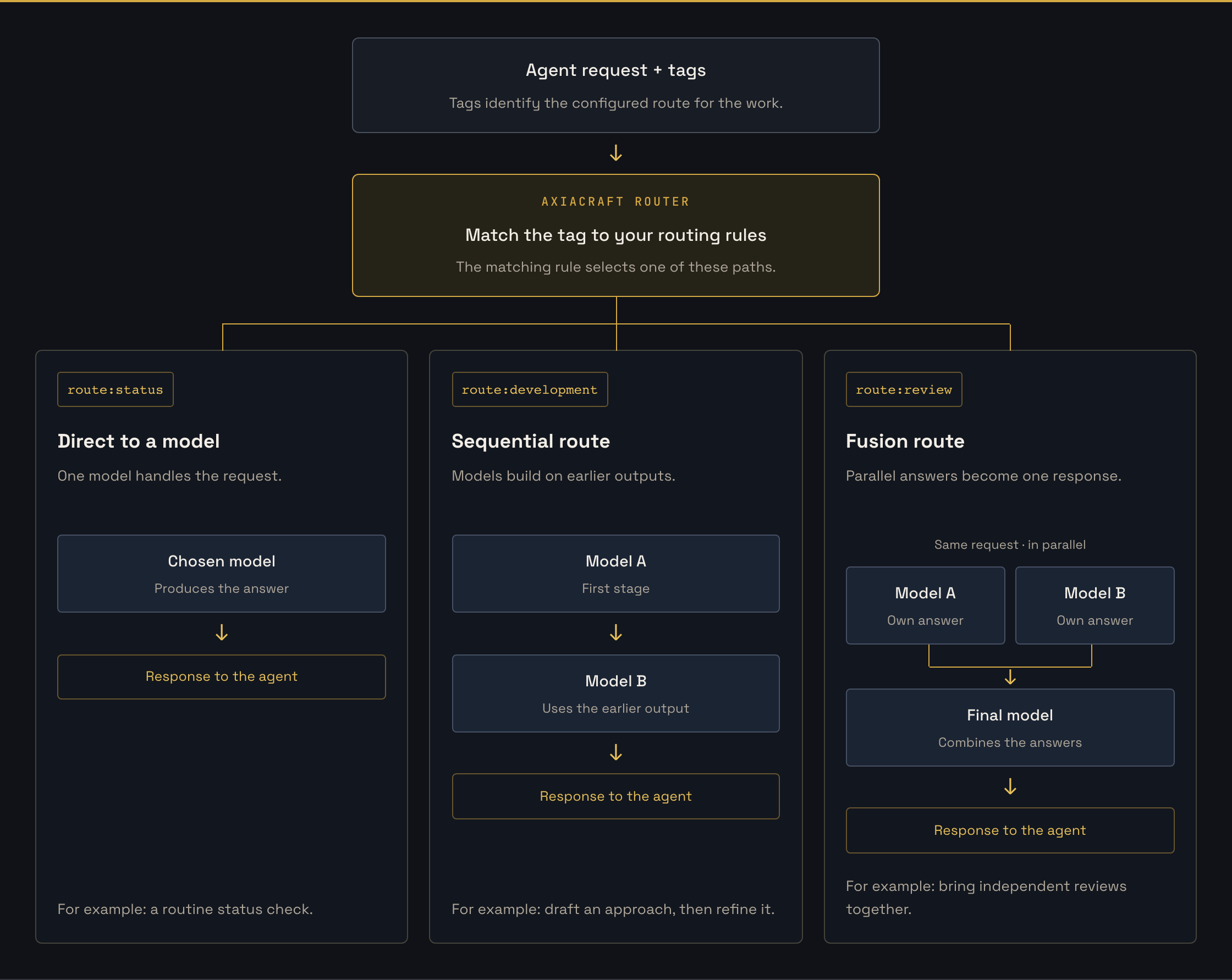
Tags attached to a request tell AxiaCraft’s router which configured route to use: a single model, a sequence of models, or several models working in parallel. Manage those choices centrally and change the models behind a tag without rewriting each agent.
Configure the approach.
Direct: send a request to one chosen model, such as a lower-cost model for status checks.
Sequential: pass work through an ordered set of models, with each stage receiving the earlier outputs.
Fusion: ask several models independently, then use a final model to bring their answers together.
Keep the choices visible.
Manage model names, prices, credentials and selection rules centrally.
Record which route was used, why it was chosen, how long it took and what it cost.
Use a configured fallback when the normal routing approach needs an operator intervention.
In practice: A simple progress check uses a modest model budget; a security review can draw on several independent assessments.
The September case study uses Fireworks.ai models through LiteLLM, the central model gateway. Providers and available routing choices depend on the installed configuration.
One request. A tag selects the route.Illustrative tags and models. Direct routes use one model; sequential routes pass earlier outputs to the next model; fusion routes combine parallel answers with a final model. Each selected route returns one response to the agent.Enlarge diagram ↗
You configure the tags, models and route type. Model usage, time and cost are recorded.
05 · Cost controls
Set a spending limit that the agents work within.
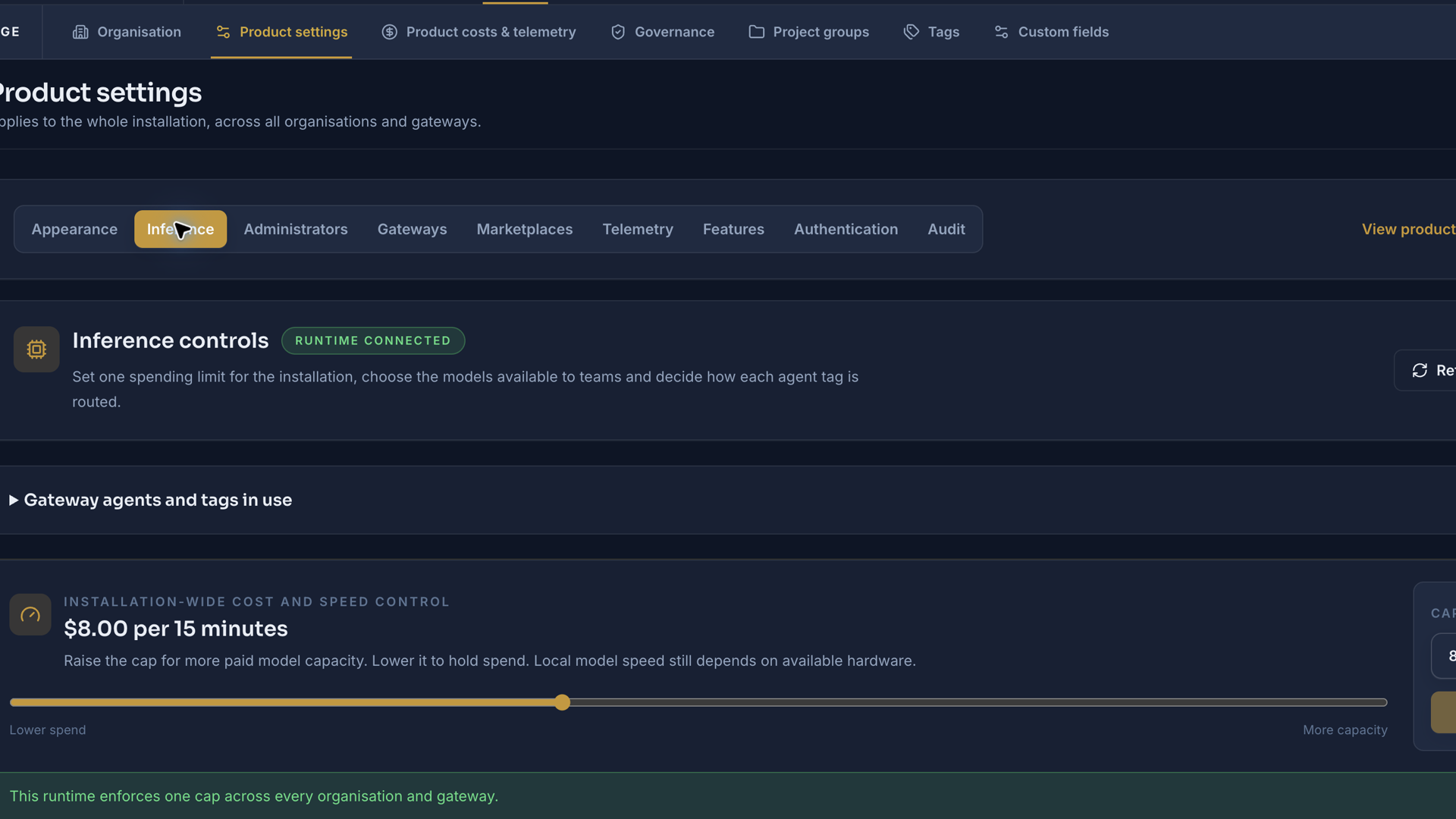
See what model work costs and control how quickly it can spend. The shared AI budget applies across active teams, so adding another team does not give it a separate allowance to spend unchecked.
Check before spending. Reserve the estimated cost before a model request starts, then record the actual usage.
Wait when the budget is full. Work pauses until budget becomes available and then resumes the same task.
Bound expensive work. Limit request sizes, output sizes, model calls and time spent on a single request.
Avoid repeat charges. Duplicate protection limits repeated final reviews; idle teams can stay quiet without routine model polling.
Trace costs to useful work. Follow usage by project, sprint, task and run, with alerts as limits are approached.
Keep estimates identifiable. Operational cost records support budgeting; provider billing remains the financial record.
Example from the case study£2.96 per rolling 15 minutes
This was the shared AI spending limit used in the study. Teams waited when it was full and continued when capacity became available. Your installation’s limit is configured to suit your workload.
The model budget controls AI-provider spending. Infrastructure, hosting, licence and support are separate costs.
Pay for workspace compute when it is needed. Agent workspaces can wake for work and return to zero running compute when idle, while retaining their files. Temporary validation environments run for the release checks; the production app stays available afterwards. Retained storage, shared services and application hosting remain part of the budget. See the costs and scaling assumptions →
Enlarge screenshot ↗Set one AI spending limit across the installation.Showcase configuration from the film. The $8 per 15 minutes shown is an example US-dollar setting, separate from the case study’s £2.96 setting. It is a spending limit, not a monthly bill.
06 · Reviews and approvals
Make review part of the delivery process.
Development work passes through quality, security and architecture review. Findings become work the team can act on, with the outcome visible alongside the original task.
Require review before work can be marked complete.
Keep test evidence, review comments and decisions attached to delivery.
Set approval points for your project, including when people need to intervene.
Connect the process to your repositories, build checks and release pipelines.
In practice: A review finding becomes an assigned fix, returns through review and is checked before the team moves on.
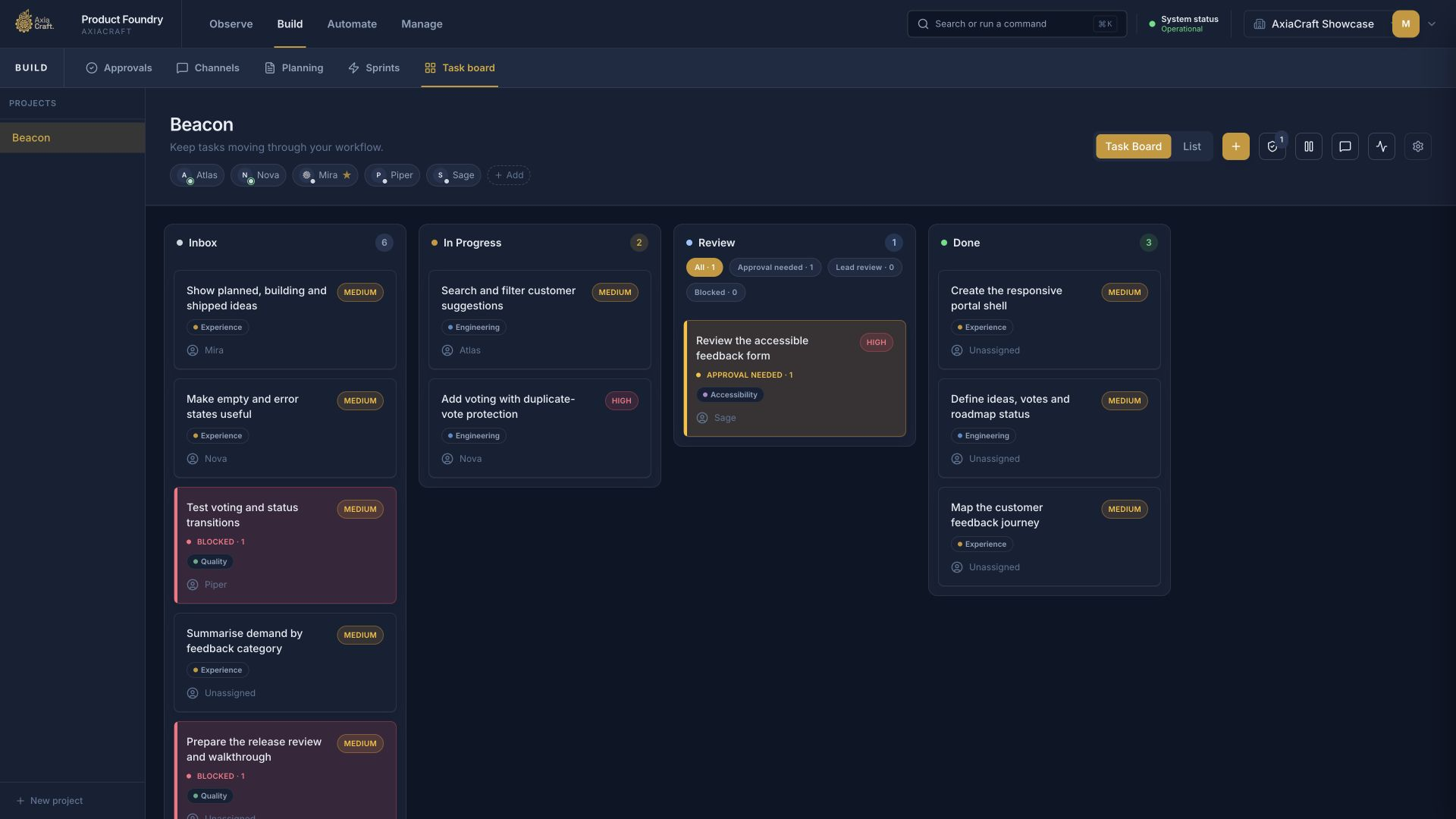
Enlarge screenshot ↗See ownership, progress and approval in one view.AxiaCraft product capture · Beacon demonstration board; task counts and statuses are example data.
Named ownersWork stays attached to an agent or role.
Review is visibleApproval-needed work has its own status.
Follow the workSee what is ready, active, under review or complete.
07 · Configuration
Fit the factory to your organisation.
Control the environment, the team and the way work moves. Configuration is shared where it should be consistent and tailored where a project needs different rules.
Organisation and environment
Manage organisations, users, administrators and access to boards.
Connect and monitor the services that run your agents.
Configure repositories, service connections, credentials and event integrations.
Apply your product identity and appearance, with organisation-specific overrides where needed.
Team and delivery
Choose agent roles, instructions, skills and tool access.
Set team size, review requirements and approval rules.
Choose automatic backlog organisation and sprint progression for the boards that need them.
Configure model routes, available providers and spending controls.
Configuration spans AxiaCraft, the services running your agents and the central model gateway. These are connected during installation and documented for your operators.
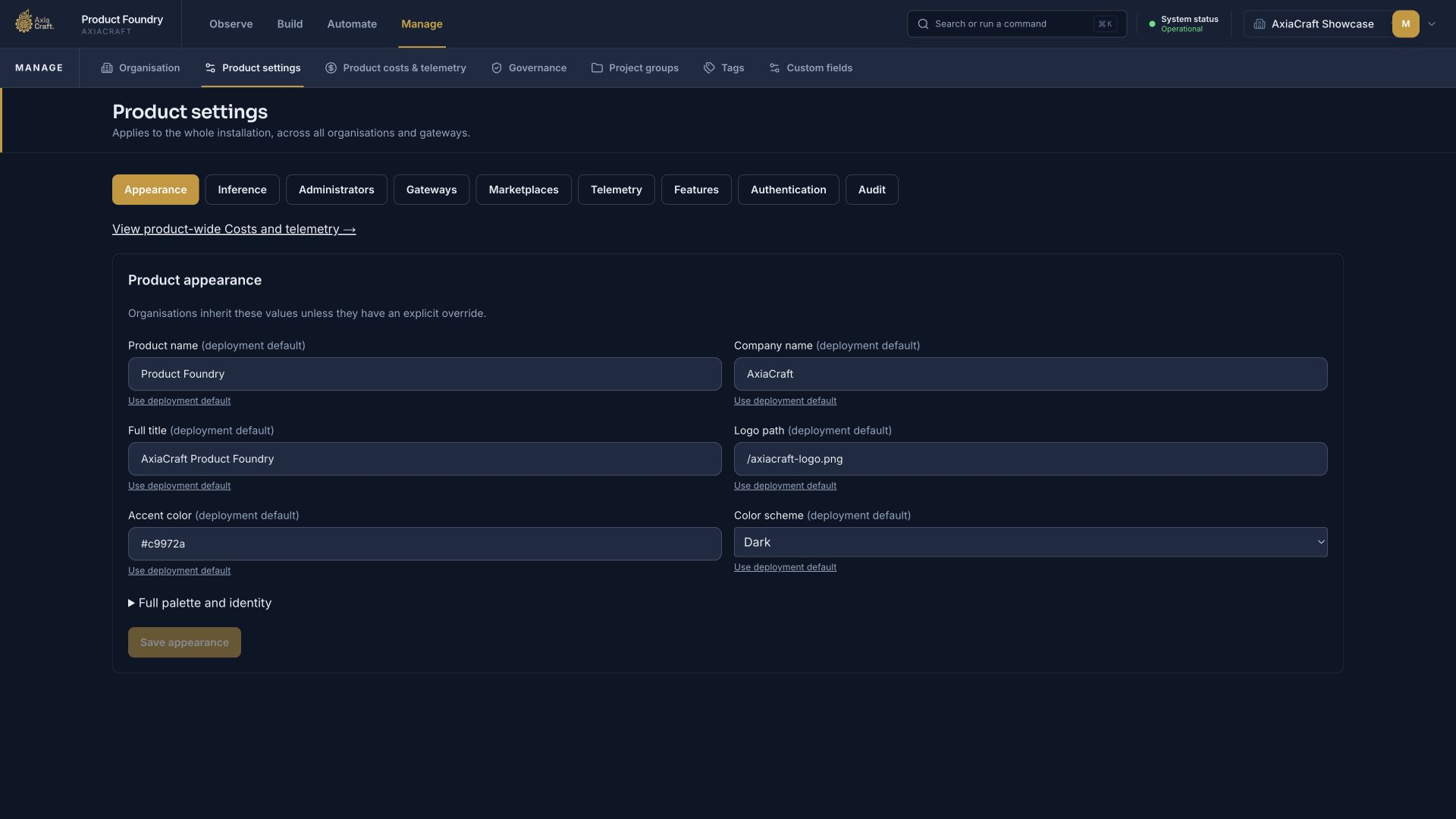
Enlarge screenshot ↗Manage shared product settings in one place.AxiaCraft product capture · deployment appearance settings, with access to inference, gateway, marketplace and governance configuration.
08 · Memory and operations
Keep context as the product grows.
The next round of work should build on what the team already knows. Shared memory keeps useful decisions and project context available, while the work history shows how the product reached its current state.
Carry decisions forward.
Store and retrieve project notes, constraints and previous decisions. Board and shared memory give agents a common reference; Rembr can provide the connected long-term memory layer.
Bring new work back into the process.
Connect product feedback, service events and external systems through APIs and webhooks—connections that pass requests and events between systems. Route incoming information to the right board or agent, then follow it through planning, delivery and review.
How it works · illustratedEach delivery cycle gives the next one more context.
01Capture decisions
Retain the agreed requirements, constraints and review findings.
02Retrieve what matters
Bring relevant project memory into the next task.
03Build on the evidence
Use feedback and previous decisions to plan the next improvement.
The work history and connected memory support continuing delivery. People retain ownership of priorities and approvals.
Put it to work
Start with your first real application.
The four-week entry installation connects the factory to your environment, proves the workflow on an agreed application and hands it over to your team.
£20,000 installation + £1,000/month licence
Agreed entry scope, excluding VAT. Optional support packages include the licence. Infrastructure and AI usage are paid separately.